I've written about KEDA before, but only in a little detail. A couple of weeks ago, a colleague asked me about KEDA because he saw my blog post regarding scalable jobs, and he had multiple questions that needed to be more evident from the documentation. I read the documentation on a diagonal because I'm looking for the specifics of my problem, not problem statements, use and things like that. I believe even you, who are reading this, will just dive through the content and take just what you need :)
What is KEDA?
Kubernetes Event Drive Automation: KEDA is an epic piece of software that bridges your event sources (e.g., message queues, databases)and, with Kubernetes Horizontal Pod Autoscalers (HPA), enables event-driven scaling for any containerized application within your cluster.
KEDA's Capabilities in Action:
KEDA boasts diverse features that empower developers to craft highly scalable and event-driven solutions. Let's explore some of its core capabilities:
Flexible Event Source Support: KEDA integrates seamlessly with various event sources, including popular choices like Kafka, RabbitMQ, Azure Event Hubs, and Azure Storage Queues. This flexibility allows you to tailor your scaling behaviour to your specific application's event ecosystem.
Fine-grained Scaling: Unlike traditional scaling solutions that often rely on CPU or memory metrics, KEDA empowers you to define precise scaling rules based on the number of unprocessed events. This ensures your application scales precisely with the incoming event stream, preventing resource overprovisioning or under-provisioning.
Scaled Jobs vs Event Jobs: KEDA empowers you to utilize two distinct scaling approaches:
Scaled Jobs: These are ideal for long-running tasks triggered by events. KEDA creates a new pod for each event, allowing parallel task processing. Once the task is complete, the pod scales down.
Event Jobs: These are perfect for short-lived tasks triggered by events. KEDA scales the number of pods based on the backlog of events, ensuring timely processing without unnecessary resource usage.
Seamless Integration with AKS: KEDA operates seamlessly within your AKS environment, leveraging HPA for scaling containerized applications. This eliminates the need for complex infrastructure setup and streamlines deployment on AKS.
Scalers Supported by KEDA in Azure:
KEDA extends its event-driven scaling capabilities to various event sources commonly used on Azure. Here's a breakdown of some popular options:
Azure Service Bus Topic / Queue Scaler: KEDA monitors the queue length and scales your application accordingly. This is ideal for scenarios where tasks are triggered by messages placed in the queue.
RabbitMQ Scaler: Integrates with RabbitMQ as the event source. Like the Azure Storage Queue scaler, KEDA monitors the queue size and scales your application to handle the backlog efficiently.
Azure Event Hub Scaler: this scaler automatically scales your application based on the number of unprocessed events within the event hub. This ensures that your application can efficiently handle bursts of incoming events without compromising performance.
Scaling a Web Crawler: Imagine a web crawler application deployed on AKS that retrieves data from websites triggered by events from an Azure Event Hub. KEDA, coupled with the Azure Event Hub scaler, can automatically scale the web crawler pods based on the number of unprocessed events in the event hub. This ensures that the crawler can efficiently process incoming website requests without bottlenecks.
Processing Image Uploads: A photo-sharing application that processes uploaded images using image manipulation libraries. KEDA, working with the Azure Storage Queue scaler, can monitor the number of pending image uploads in the queue and scale the image processing pods accordingly.
Start/Stop VMs: The Azure Dev/Test resource that shuts down VMs can be supercharged with new code that starts and stops VMs or VMSS based on time zones. Paired with Azure Functions, you can use KEDA to scale those functions out and in depending on the number of VMs in a Service Bus queue.
KEDA presents a compelling solution for achieving event-driven scalability within your clusters. Its flexibility, diverse event source support, and seamless integration make it a valuable tool for modern cloud-native applications. As you explore the vast potential of KEDA, remember to leverage the extensive documentation (even though I said, I don't read it that far)
Improved Performance: By scaling precisely with the event stream, KEDA helps maintain optimal application responsiveness. This reduces processing delays and ensures your application delivers a seamless user experience.
Simplified Management: Gone are the days of manually adjusting scaling thresholds based on CPU or memory usage. KEDA removes the complexity and introduces a more intuitive approach to scaling based on event volume.
Reduced Operational Overhead: Automated scaling based on real-time events frees your development team to focus on core application features rather than managing intricate scaling configurations.
Deployment Considerations:
While KEDA unlocks a new level of scalability, there are some key factors to consider when deploying it in production:
Event Source Selection: Choosing the right event source for your application is crucial. When selecting an event source that works best with KEDA, consider factors like message persistence, throughput requirements, and integration capabilities.
Monitoring and Observability: Implementing robust monitoring tools is essential to track KEDA's scaling behaviour and application performance. Metrics like event queue length, pod scaling events, and application latency provide valuable insights.
Alerting and Error Handling: Define clear alerts based on key metrics to identify potential issues proactively. Furthermore, establish robust error-handling mechanisms within your application to gracefully handle unexpected events or scaling failures.
Performance Optimization: Fine-tune your scaling configurations through trial and error to ensure your application scales efficiently with minimal resource overhead.
Examples:
1. Scaling a Web Crawler with Azure Event Hub Scaler:
Here's an example that crawls a list of websites and pushes it to Event Hub:
import requests
from azure.eventhub import EventHubConsumerClient as EventHubClient, EventData
import json

connection_str = "<event-hub-connection-string>"
event_hub_name = "hubname"


def crawl_website(url):
    """Crawls a website and sends an event to the event hub."""
    try:
        response = requests.get(url)
        response.raise_for_status()
        # Process website content here (e.g., extract data)
        data = {"url": url, "content": response.text}
        send_event_to_event_hub(data)
    except requests.exceptions.RequestException as e:
        print(f"Error crawling {url}: {e}")


def send_event_to_event_hub(data):
    client = EventHubClient.from_connection_string(connection_str, event_hub_name)
    client.send(EventData(json.dumps(data).encode("utf-8")))


if __name__ == "__main__":

    urls = ["https://google.com"]
    for url in urls:
        crawl_website(url)
        print(f"Crawled {url}")
Build and push the image to an Azure Container Image and then use the following YAML to use it.
Deployment: Defines a standard Deployment for the task processor application.
ScaledJob: This defines the KEDA ScaledJob resource.
JobSpec: This section defines the Job template that will be used for each spawned task.
The container within the template utilizes the same image as the Deployment container.
The command includes an additional argument $KEDA_TASK_DATA which will be populated by KEDA with the event data from the queue.
The restartPolicy is set to Never as each task is intended to be processed only once.
Triggers: The ScaledJob triggers on the azurestoragequeue type, similar to the previous example.
ScaleTargetRef: This references the Job created by the ScaledJob when processing an event.
Key Differences from ScaledObject:
ScaledJob vs. ScaledObject: This example utilizes a ScaledJob instead of a ScaledObject with an event job.
Job Lifecycle: Unlike a ScaledObject that manages scaling of a single Deployment, a ScaledJob creates a new Job instance for each event.
Task Processing: The Python code retrieves the event data (task information) from the $KEDA_TASK_DATA environment variable injected by KEDA and processes it within the process_task function.
Job Completion: After processing the task data, the Job instance completes and is not restarted due to the Never restart policy. KEDA scales the number of Jobs based on the backlog of events in the queue.
I use KEDA every day, and every time, I'm happy that I found it ages ago. Recently, I had to create a processing flow that processes five million or more events per minute when a spike happens, and without problems, KEDA solved scaling out and in when the load required it.
The use cases are very vast with the system and I recommend experimenting with it. Have it installed in a cluster and play around with it. But be warned that if you have the cluster autoscaler on, KEDA will trigger it if you need to be careful.
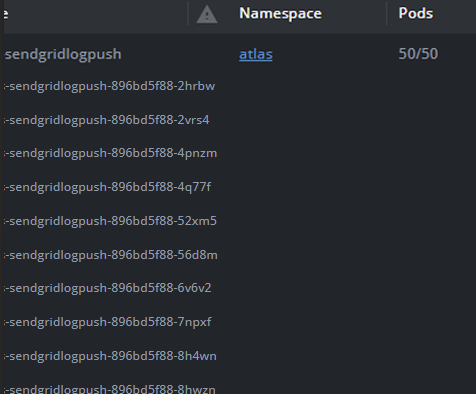
That's it, folks, have a good one! P.S. Keda chugging in production:
Platform guardrails prevent damage but often turn into friction machines. How to design guardrails that actually prevent bad patterns, layer detection and correction, and build platforms developers trust.
APIM isn't just a gateway. It's a governance layer that enforces consistency across AKS, Container Apps, and other platforms. When to use it and when to keep things simple.
If you're still deploying to Azure from GitHub Actions with static credentials in 2026, you have better options. Here's how to eliminate credentials from GitHub entirely using OIDC and workload identity, and why it matters.