
API Management as a Runtime Control Plane for AKS and Container Apps
APIM isn't just a gateway. It's a governance layer that enforces consistency across AKS, Container Apps, and other platforms. When to use it and when to keep things simple.


I once built a policy set so strict that three teams started using personal Azure subscriptions to get actual work done. I found out about it two months later when the bill alerts started firing on subscriptions I didn't even know existed. Boy, that was a fun conversation with management.
Anyway, platform teams spend a lot of time writing governance documentation that nobody reads, publishing architecture standards that get stepped over in emergencies, and maintaining runbooks that only work for people who already know them. Then they wonder why the platform still ends up with untagged resources, publicly accessible blob containers, orphaned managed identities, and developer accounts running arbitrary code with admin permissions. The usual diagnosis is that developers are reckless, and sometimes they are, but mostly the real problem is simpler: soft guidance doesn't actually prevent things, it just generates shame.
Soft guidance is a memo that says "please tag your resources." Hard guardrails are a policy assignment that prevents a resource from being created unless it has a tag. The difference matters: hard guardrails work the same way for everyone, at the same time, without requiring cultural change or quarterly training refreshers.
I've watched enough platform teams go through this cycle to know it follows a pattern. Year one, publish standards and hope. Year two, add a governance team to chase non-compliance. Year three, realize you've built a compliance machine that requires a ticket for every exception and takes two weeks to approve a reasonable departure. Year four, developers start using personal subscriptions or shadow infrastructure because your governance is now more expensive than the risk it prevents. The platform is technically more compliant, but it's also less trustworthy :)
I learned this the hard way: if your governance is more expensive to follow than to ignore, people will ignore it, and you can't blame them. The goal here is to show you how to build guardrails that actually prevent damage without turning the platform into a ticket machine. That's the hard part. The technology isn't what makes it hard, but rather that good guardrails require a design decision you can't delegate: what's actually dangerous, what's just different, and what's expensive enough that you should build an exception process instead of blocking it outright.
Good guardrails share a few properties that matter more than any specific policy or tool:
Bad guardrails? Well, you know them when you see them: they block entire classes of technology instead of specific bad patterns, they surprise developers at deploy time because nobody documented what's blocked, and they have no exception process or the exception process takes longer than just building a workaround. They pile up over time because nobody reviews whether they're still useful. I've seen policy sets with 40+ rules where half of them were added because of one incident three years ago that nobody remembers anymore.
If your platform has drifted into bad guardrails, that's fixable, but it requires acknowledging that your current governance probably needs to be either loosened or redesigned, which is a conversation that's usually uncomfortable and so most teams just add more policies. Whatever you do, don't do that.
graph TD
    L1["Layer 1: Azure Policy\nSubscription & Resource Controls"]
    L2["Layer 2: Network Controls\nNSG, Private Endpoints, Firewall"]
    L3["Layer 3: Workload Identity\nManaged Identity, RBAC"]
    L4["Layer 4: Admission Control\nGatekeeper, Kyverno"]
    L5["Layer 5: Observability\nLog Analytics, Alerts, Dashboards"]
    L1 --> L2 --> L3 --> L4 --> L5
Alright, to design guardrails that work you need a mental model of the system you're protecting. Don't think of these five layers as a perfect framework you need to implement top to bottom, think of them as the places where things go wrong and where you can catch them.
Layer 1: Policy (Subscription/Management Group)
Controls what resources can be created and in what configuration, which prevents the most obvious misconfigurations:
Deny: unencrypted storage accounts
Deny: public database access
Deny: untagged resources
Audit: resources without cost center tag
Audit: VMs larger than D16s_v3
Layer 2: Network (Virtual Network/NSG/Private Endpoints)
Controls what traffic is allowed between resources, which prevents lateral movement and exposure:
Deny: outbound traffic to unknown IPs
Deny: inbound traffic to databases from internet
Allow: specific service-to-service routes only
Audit: traffic to suspicious ports
Layer 3: Identity (RBAC/Entra/Workload Identity)
Controls who or what can act on resources, and workload identity becomes the critical layer here since it captures audit trails:
Deny: service principals with legacy credentials
Require: workload identity for AKS pods
Audit: all credential uses
Layer 4: Admission (AKS Gatekeeper)
Controls what workloads can run in the cluster:
Audit: pods running as root
Audit: missing resource limits
Audit: privileged containers
Audit: missing pod security labels
Audit: missing Network Policy
Layer 5: Observability and Response
Logs what actually happened and creates signals for detection and compliance:
Log: all policy violations
Alert: critical violations in real time
Report: compliance dashboard daily
I think of each layer as a speed bump with a documented path around it, not a wall.
Preventative guardrails are the most satisfying kind since they prevent a resource from being created unless it meets criteria, but they're also the most dangerous in terms of operational friction, which is why you have to get them right before deploying broadly.
The guardrails worth preventing are ones that represent real bad outcomes with no reasonable exception:
An Azure Policy rule to prevent storage accounts with public blob access enabled:
{
  "mode": "all",
  "policyRule": {
    "if": {
      "allOf": [
        {
          "field": "type",
          "equals": "Microsoft.Storage/storageAccounts"
        },
        {
          "field": "Microsoft.Storage/storageAccounts/allowBlobPublicAccess",
          "equals": "true"
        }
      ]
    },
    "then": {
      "effect": "deny"
    }
  }
}
This says: if you try to create a storage account with public blob access enabled, the CREATE request fails. The error is immediate and the developer knows why.
Advantages:
Disadvantages:
For a typical cloud platform:
| Policy | Effect | Rationale |
|---|---|---|
| Require tags (Name, Owner, Cost Center) | deny | Untagged resources cause billing black holes. |
| Require HTTPS-only on storage accounts | deny | Transport encryption closes the transit exposure gap. |
| Restrict public IP on databases | deny | Public databases are a known harm pattern. |
| Restrict public network access on PaaS services | deny | Public endpoints are a known exposure pattern. |
| Restrict storage account blob public access | deny | Public blobs are rarely intentional. |
| Require soft delete on Key Vault | deny | Without it, accidental deletion destroys the secret model. |
| Restrict allowed resource locations | deny | Unused regions create licensing and support overhead. |
| Require Managed Identity for compute | deny | Unmanaged service principals are governance failures. |
| Restrict allowed VM sizes | deny | Oversize VMs are the easiest cost waste to prevent. |
Each of these is a real guardrail that prevents a pattern with no reasonable exception, and you can find the full list of Azure Policy built-in definitions on MS Learn. If you find yourself building exceptions regularly, your policy is wrong, not your developers.
When deploying preventative policies:
If you skip step 2, you'll block legitimate work and destroy trust, and that isn't guardrails, that's punishment.
Not every governance concern is worth preventing. Some things are worth knowing about and remediating instead. Detective controls are cheaper since they don't block deployment, but they require an actual operational process to respond to findings.
Detective guardrails work through audit logging, where Azure Policy evaluates any resource property and logs non-compliance without blocking. Policies run on a schedule (usually every 24 hours) and a compliance dashboard shows what's out of compliance, so you get visibility without friction, but only if someone actually looks at the dashboard and acts on what it shows.
Detective guardrails are appropriate for things where exceptions are common and reasonable:
This policy finds storage accounts that lack blob retention policies:
{
  "mode": "all",
  "policyRule": {
    "if": {
      "field": "type",
      "equals": "Microsoft.Storage/storageAccounts"
    },
    "then": {
      "effect": "auditIfNotExists",
      "details": {
        "type": "Microsoft.Storage/storageAccounts/managementPolicies",
        "existenceCondition": {
          "field": "name",
          "equals": "default"
        }
      }
    }
  }
}
This doesn't block anything, it just reports: "we have 47 storage accounts without lifecycle policies."
The operational follow-up is a runbook:
This is more work than prevention, but it's honest work. I know, I know, it sounds tedious, but you're actually finding things and making decisions about them, not just blocking to feel safer.
In AKS, detective controls take a different form. Azure Policy add-on for AKS (powered by Gatekeeper) evaluates admission requests and can audit or reject workloads.
Example, detect pods missing required labels:
apiVersion: constraints.gatekeeper.sh/v1beta1
kind: K8sRequiredLabels
metadata:
  name: require-pod-owner-label
spec:
  match:
    kinds:
      - apiGroups: [""]
        kinds: ["Pod"]
  parameters:
    labels:
      - key: "app"
      - key: "owner"
In audit mode this reports every pod missing the required labels, and in enforcement mode it blocks pod creation entirely.
For AKS security:
| Policy | Effect | Purpose |
|---|---|---|
| Detect pods running as root | audit | Root containers bypass isolation. |
| Detect missing resource limits | audit | Unbounded pods cause cluster instability. |
| Detect privileged containers | audit | Privileged containers bypass isolation. |
| Detect hostPath mounts | audit | Host mounts expose host filesystem. |
| Detect missing pod security labels | audit | Labels are the foundation of pod security. |
| Detect missing Network Policy | audit | Network isolation isn't automatic. |
These are audit first since workload shape varies and some workloads actually need elevated privileges. The point is that you know about it and make a decision, which is pretty much the whole philosophy of detective controls: awareness first, action second.
Corrective controls go further than detection, they find a non-compliance and fix it automatically. Now, that sounds great but requires careful design since the fix has to be obviously correct.
Useful corrective controls:
Add missing tags: if a resource is missing a tag, add a placeholder and a note saying "this resource was auto-tagged on date X, please review and update."
Remove public blob access: if someone creates a storage account and accidentally enables public blob access, automatically disable it.
Append network security group rules: if someone creates an NSG without explicit deny rules, automatically append a deny rule for outbound traffic to suspicious ports.
The key is that corrective controls should never surprise the resource owner. If a policy is going to modify something, the owner should know about it in advance, or it should be so obviously correct that the modification isn't surprising.
Workload identity isn't just a security feature, it's a governance feature. When all pods in a cluster are forced to authenticate through workload identity, you gain something more than "pod can access Key Vault." You gain the ability to audit every credential use.
How workload identity works as a guardrail:
azure.workload.identity/use: "true", and its service account must be annotated with the client ID of the managed identity it assumes.This means every secret access is traceable back to a specific pod in a specific namespace at a specific time, which eliminates the "someone used the shared service principal and we don't know who" problem entirely.
To enforce workload identity adoption, use a Gatekeeper policy (K8sRequiredWorkloadIdentityLabel is a custom constraint; you'll need to create the ConstraintTemplate first, unlike the standard K8sRequiredLabels from the Gatekeeper library):
apiVersion: constraints.gatekeeper.sh/v1beta1
kind: K8sRequiredWorkloadIdentityLabel
metadata:
  name: require-workload-identity-label
spec:
  match:
    kinds:
      - apiGroups: [""]
        kinds: ["Pod"]
    excludedNamespaces:
      - kube-system
      - kube-public
  parameters:
    label: "azure.workload.identity/use"
In audit mode this finds pods without workload identity, and in enforcement mode it blocks them.
The advantage is that workload identity enforcement creates a hard boundary: it's required rather than optional, which simplifies governance since developers can't accidentally create unauditable secret access patterns.
That being said, the disadvantage is real too. Every pod author has to know their managed identity's client ID and configure the service account correctly, which requires:
If any of these is missing, workload identity enrollment becomes bottlenecked, which is why you need process design alongside technical design. Check out the workload identity quickstart for the technical setup, but skip the process part and you'll just have a new kind of friction replacing the old kind.
I've watched teams build guardrails with no legitimate path to exception, and the result is always the same: workarounds, shadow infrastructure, and forever exceptions because the exception process is too expensive.
A good exception process has these properties:
Who can request: Any application or platform team member
Approval criteria (pick one):
Approval authority: Platform team lead (can be delegated to service owners)
Duration: 30 days for testing, 90 days for permanent, 1 year for high-cost exceptions
Tracking: Exception recorded in a change tracker (GitHub issues, Azure DevOps, etc.)
Review cadence: Weekly review of active exceptions, quarterly review of all to determine if the policy should be adjusted
This is a documented way to say "yes, this is an exception, here's why, here's when it expires, here's what we audit."
The key is that exceptions are tracked and reviewed, and if you have 47 active storage account encryption exceptions then something is wrong with the policy. Either:
An exception process is what forces that conversation to happen explicitly.
One reason governance often becomes a ticket machine is that nobody knows whether it's working. You have policies deployed and you block deployments occasionally, but then you get audited and have to scramble to prove what your governance actually does.
Good governance has evidence, and you should be able to answer:
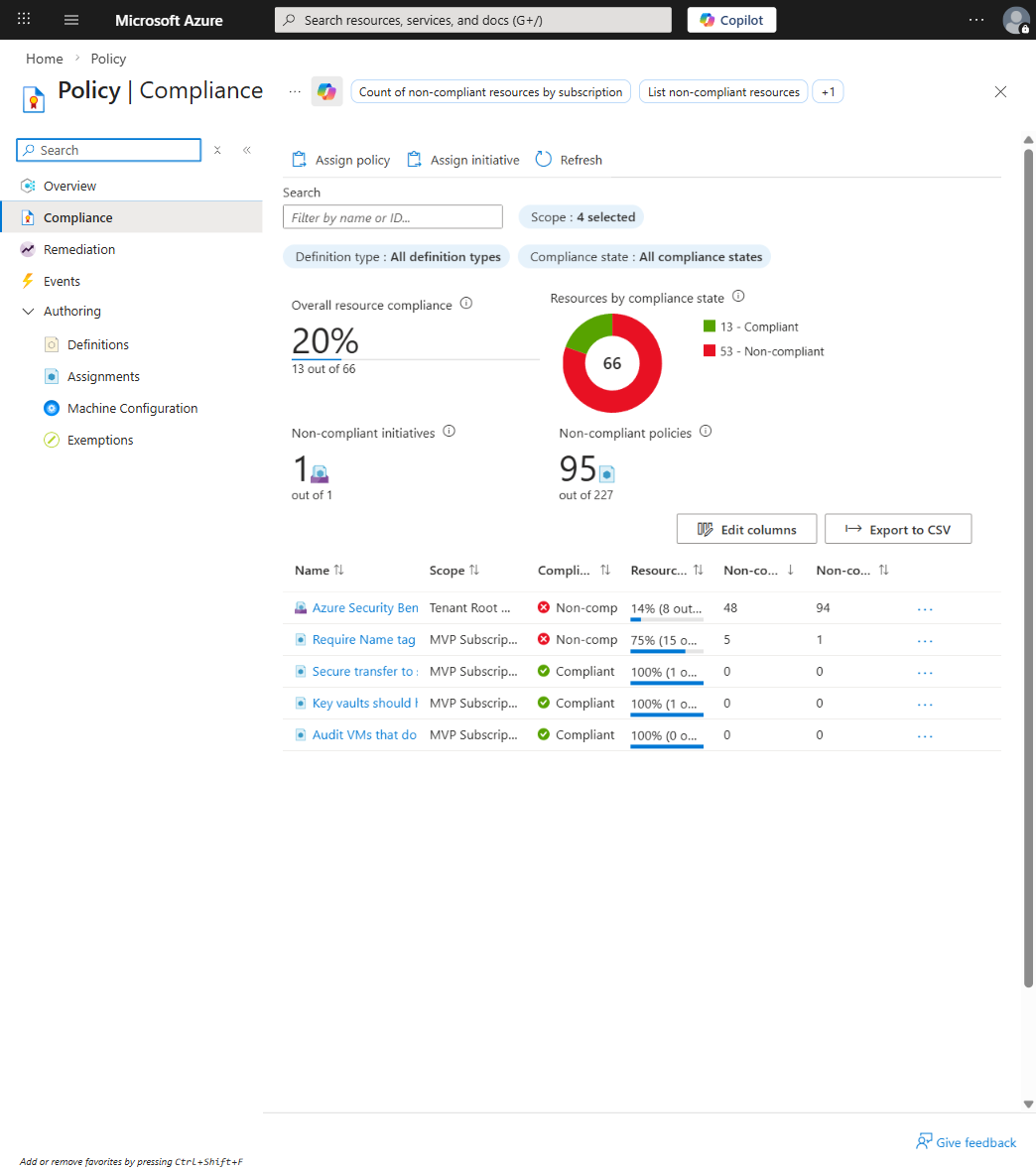
In the Azure portal, go to Azure Policy > Compliance:
| Policy | Compliant Resources | Non-Compliant | Compliance % |
|---|---|---|---|
| Require tags | 847 | 12 | 98.6% |
| Require HTTPS-only | 2,304 | 0 | 100% |
| Detect lifecycle policies | 1,024 | 47 | 95.4% |
| Require workload identity | 312 | 8 | 97.4% |
This tells you:
To see how many deployments are blocked:
AzureActivity
| where OperationNameValue endswith "/write"
| where ActivityStatusValue == "Failed"
| where Properties has "RequestDisallowedByPolicy"
| summarize Count = count() by bin(TimeGenerated, 1d)
If the number is zero, either your policies aren't preventing anything or everybody already knows what they're not allowed to do, which is actually worth investigating either way.
For exceptions, track the cost impact:
| Exception | Resource | Cost/Month | Expiry | Owner |
|---|---|---|---|---|
| No encryption | storage-prod-123 | $50 | 2026-05-01 | app-team |
| Open database | db-legacy | $200 | 2026-04-15 | analytics-team |
If an exception costs $200/month, is it justified? If it costs $5,000/month for something that was supposed to be fixed six months ago, the exception process should've escalated it, which is exactly the kind of visibility this tracking provides.
Workload identity and policy protect your cloud infrastructure, but delivery controls protect the deployment mechanism itself.
In my experience, the worst cloud damage doesn't come from someone running Azure CLI in the portal. It comes from automation with overpermissioned credentials, things like GitHub Actions workflows with overpermissioned service principals, Azure DevOps pipelines with admin access, and infrastructure automation jobs that could do far more than the author intended.
So, delivery controls use the same OIDC + workload identity pattern as secretless pod deployments, but applied to your CI/CD system.
Configure GitHub Actions to authenticate to Azure using OIDC:
name: Deploy to AKS
on: [push]

jobs:
  deploy:
    runs-on: ubuntu-latest
    permissions:
      id-token: write
      contents: read
    steps:
      - uses: actions/checkout@v4

      - uses: azure/login@v2
        with:
          client-id: ${{ secrets.AZURE_CLIENT_ID }}
          tenant-id: ${{ secrets.AZURE_TENANT_ID }}
          subscription-id: ${{ secrets.AZURE_SUBSCRIPTION_ID }}

      - run: |
          kubectl apply -f deploy.yaml
The credentials here aren't secrets, they're environment variables pointing to your Entra application, which has a federated credential that only accepts GitHub Actions OIDC tokens from your repository, so the workflow can't impersonate another repository's identity.
This means if someone pushes a malicious deploy.yaml it's deployed using the same limited credentials, which can only:
Nothing more. That's pretty much the whole point of least privilege applied to CI/CD.
Azure DevOps pipelines can use Managed Service Identity that Azure authenticates at runtime, which means no secrets are checked in, credentials are short-lived, and every use is audited.
A platform with strict guardrails but good developer experience is useful, while a platform with strict guardrails and terrible developer experience is abandoned. Building both simultaneously isn't easy, but here's what actually works.
Good developer experience in a guardrailed platform requires:
When a developer hits a guardrail, provide documentation:
Bad error: "Deployment failed: Policy violation"

Good error:
"Deployment failed: Azure Policy 'Storage Account Public Access' requires
allowBlobPublicAccess = false
See: https://docs.company.com/policies/storage-public-access
Request exception: https://docs.company.com/exception-process"Provide templates that already comply with guardrails, so if developers use your standard Storage Account template they can't accidentally create a publicly accessible account since the template disables public access by default.
You can do this with:
Let developers validate their infrastructure code against policies before pushing, which means a CLI tool that checks Bicep, Terraform, or Kubernetes manifests against policies and prevents surprise failures at CI time.
Make it easy to request exceptions. An automated form that records the reason, cost impact, and duration and then routes to the right approval authority is all you need.
Once per quarter, publish a governance update covering what policies changed, what exceptions expired, and what the compliance posture looks like. This keeps governance visible and shows that it's being actively maintained, not just abandoned after initial setup.
Deploying guardrails all at once to existing infrastructure is chaos, you either block everyone or exempt everything. Here's the approach that's actually worked for me.
Deploy guardrails to new resources only. In Azure Policy, use scope filters:
{
  "if": {
    "allOf": [
      {
        "field": "type",
        "equals": "Microsoft.Storage/storageAccounts"
      },
      {
        "field": "tags['CreatedAfter']",
        "greater": "2026-03-01"
      }
    ]
  },
  "then": {
    "effect": "deny"
  }
}
This says: starting March 1st, all new storage accounts must comply with the policy. Existing ones are unaffected.
Advantages:
Audit existing resources. Generate a report:
For each resource, determine: fix, migrate to new resource, or exception?
Fix resources based on priority:
After a year, enable full enforcement. Any resource created without compliance is blocked, and existing non-compliant resources are either fixed or explicitly exempted (reviewed quarterly).
The whole timeline is about building trust without surprise disruptions.
Even well-designed guardrails sometimes block legitimate emergency work, which is why you need a break-glass process for incidents.
A break-glass model:
RBAC-based implementation:
Role: "Policy Break-Glass Approver"
Permissions:
  - Manage policy exemptions (limited to own subscription)
  - Restrict to specific policy types
Assignments:
  - On-call incident commanders only
  - Automatically expires at end of shift
In your incident runbook:
If guardrails are blocking incident response:
  1. Ask: "Is this a real incident?"
  2. Ask: "Do we have < 30 minutes?"
  3. Page on-call infrastructure lead to approve break-glass
  4. Document what was done
  5. After incident, review what the permanent solution should be
This protects two things: the ability to respond to emergencies and the integrity of the guardrail system, which are both critical to maintain.
Governance isn't free. Good governance is cheaper than bad governance, but it's not zero.
| Component | Cost/Month | Why |
|---|---|---|
| Azure Policy assignments | $0 | Included with subscription |
| Gatekeeper (add-on to AKS) | varies | CPU/memory resource on cluster |
| Log Analytics for compliance logging | $50-500 | Depends on log volume |
| Platform team time (policy design) | ? | 20-40 hours/month |
| Component | Cost Impact | Notes |
|---|---|---|
| Exception approval overhead | +1-2 hours/exception | 47 exceptions = 47-94 hours |
| Policy tuning and adjustment | +5-10 hours/month | Rules that are too strict get adjusted |
| Compliance audit and reporting | +5 hours/month | Monthly governance dashboard |
If you have five incidents per month and each costs 2 hours, that's 10 hours, and if each incident would've caused $10k in undetected damage then the ROI is obvious.
The tradeoff is straightforward: more strict guardrails means more prevention but also more friction and more exceptions, while fewer guardrails means less friction but also less prevention and more damage.
The goal is the right amount of protection for your operational risk and developer productivity.
Teams add policies when scared of something but never remove them, so after three years you have 47 policies and nobody remembers why 11 of them exist.
Fix: quarterly policy audit where for each policy you ask whether it's preventing a real harm pattern and whether it's causing more friction than the harm it prevents. If the answers are "no" and "yes," delete it.
A policy that audits non-compliance but never gets remediated is just noise, which is easy to create and easy to forget.
Fix: for every audit policy, define a response SLA so that if a non-compliance is found it either gets fixed or escalated to an exception within 7 days. If neither happens, the policy isn't working.
Deploying a deny policy without understanding consequences and providing a migration path causes chaos. I've seen this break a Friday afternoon pretty badly :)
Fix: always audit first, always provide a 30-day warning before enforcement, and always have a migration guide.
If it takes two days to get an exception approved but only one day to build the compliant version, something is wrong with the process design.
Fix: the exception process should take less than 4 hours from request to approval for documented cases.
Developers who think guardrails exist to prevent them from working will find ways around them, which means personal subscriptions, shadow infrastructure, and opacity.
Fix: frame guardrails as "we're trying to catch bad things automatically so you don't have to worry about them," and demonstrate that guardrails save time and reduce toil.
If developers have to request Entra applications through three teams and it takes a month, workload identity adoption becomes bottlenecked, and that won't fly.
Fix: automate Entra application creation so that when a developer deploys a pod without workload identity annotation a bot creates the application and returns the annotation.
Anyway, I've been through enough governance cycles to know what works and what doesn't. The platforms that work are the ones where developers don't feel like they're negotiating with governance, they just have guardrails that catch obvious mistakes while leaving room for legitimate complexity. The platforms that fail are the ones where guardrails feel like punishment, and developers start circumventing them with personal subscriptions and shadow infrastructure.
I for one run audit mode before enforcement on everything, provide compliant templates so developers don't have to think about rules, and review policies quarterly to remove the ones that aren't pulling their weight anymore. It's not glamorous work, but it's the difference between a platform people trust and a platform people work around.
The real test is simple: when your guardrails block something, is it usually because something actually bad was about to happen? If yes, you're doing it right. If your guardrails are mostly blocking legitimate work and creating ticket overhead, you've got a design problem, not a compliance problem.
That being said, have a good one!

APIM isn't just a gateway. It's a governance layer that enforces consistency across AKS, Container Apps, and other platforms. When to use it and when to keep things simple.

If you're still deploying to Azure from GitHub Actions with static credentials in 2026, you have better options. Here's how to eliminate credentials from GitHub entirely using OIDC and workload identity, and why it matters.

Multi-region architecture is sold as inevitable, but it is not. This guide covers when to build multi-region systems, how to choose between active-active and active-passive models, how to design for data consistency, and how to test failover without creating incidents. Written for architects and ...