This
is something I encountered at a client and I figured that I should
write it here because it took a while to find the solution and the only
answer came via a support ticket to MS.
A
while back when Azure DevOps was called VSTS or Visual Studio Online,
you had the possibility to link the tenant to your Azure subscription
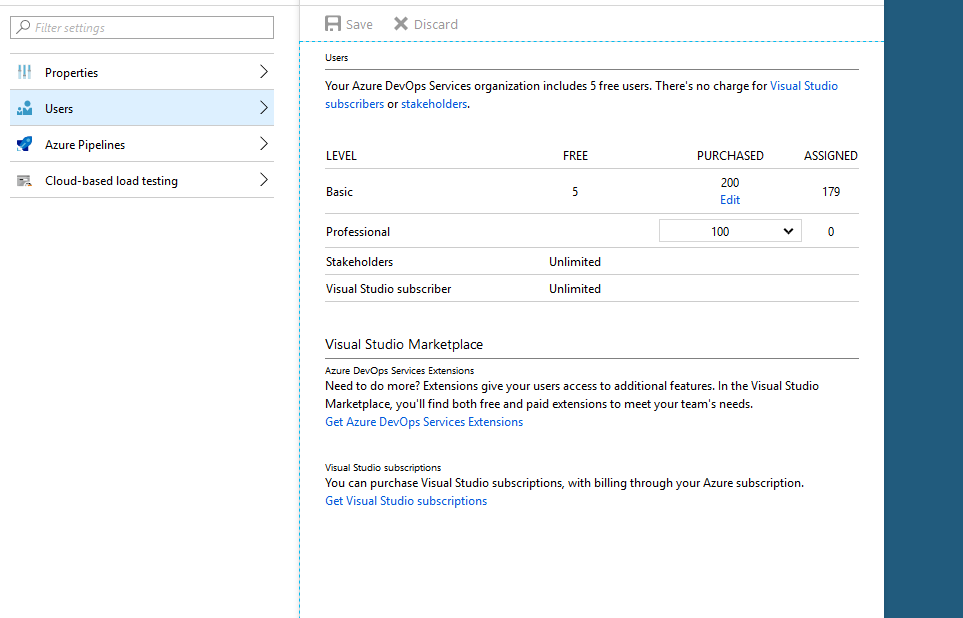
for billing purposes. This thing allowed you to purchase basic use right
licenses to the platform and it even allowed you to purchase Visual
Studio Professional licenses which allowed you to license the user VS
Pro installations via the platform.
Azure view
The
problem that I faced with this customer was that he was in this
position and suddenly they started facing issues with the VS Pro
licenses starting to expire and not working anymore. We tried figuring
out what was the problem and why it didn’t work but unfortunately we hit
a dead end and had to open a support ticket so we can get some
assistance while in parallel we were investigating.
On
a hunch we purchased a few VS Pro Monthly licenses for some users to
test out a theory and the lucky part was it worked but we didn’t have an
answer as to why the issue existed.
The
answer came from the support person on MS end which provided an awesome
explanation as to why the problem existed and how to basically fix it.
The
problem was that licensing users via the Azure Portal was deprecated a
while ago and MS didn’t have a solution for seamless migrations to the
new licensing model, so they allowed it to work for existing customers
while they removed the capability from the portal.
The
licenses that appeared on the billing invoice were called “VSPRO –
Monthly” which coincidentally matches the name with the VS Pro licenses
from the marketplace. The reality was that the licenses that you could
get from the Azure Portal were “Professional” Licenses which were tied
to the old VSOnline model and it was allowed to work in parallel until
it died by itself.
Basically
the old Professional license allowed you to run Visual Studio
Professional and be a licensed user in VSTS / Azure DevOps but being
deprecated, updates or newer versions of Visual Studio (starting from
2017 and going to 2019) simply started not being able to parse that
licensing info assigned to the work account for the user and the
instances ended up in an Extended Trial mode.
The solution to this problem was to simply purchase the licenses from the marketplace, assigned them to all the “Professional” and after a day or two just remove the offering from the Azure Portal.
After doing the whole operation, everything licensed correctly and the issue was solved.
Platform guardrails prevent damage but often turn into friction machines. How to design guardrails that actually prevent bad patterns, layer detection and correction, and build platforms developers trust.
APIM isn't just a gateway. It's a governance layer that enforces consistency across AKS, Container Apps, and other platforms. When to use it and when to keep things simple.
If you're still deploying to Azure from GitHub Actions with static credentials in 2026, you have better options. Here's how to eliminate credentials from GitHub entirely using OIDC and workload identity, and why it matters.